
PS WebSolution HR SmartForm
A simple, fully automated and configurable process automation solution to replace your paper Personal Action Forms or online PeopleSoft HR transactions?
PS WebSolution is the industry leading vendor for PeopleSoft self-service and process automation applications and we understand your pain and frustration. This pain motivated us to create the PS WebSolution HR SmartForm Package Application; a single, user friendly SmartForm with SmartWizard, a guided a Question & Answer wizard and built-in multi-step AWE approval processes that allow managers and administrators to perform any Job or Position related change.
The Solution: PS WebSolution HR SmartForm
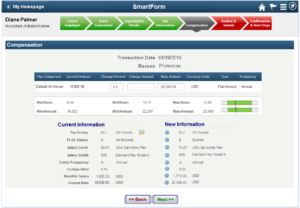 An intuitive, fully configurable application that can complete ANY job or position transaction using SmartWizard, a Q & A wizard to guide users through each transaction. It’s like Turbo Tax for HCM.
- Full Position Management support allows managers to create
new positions or amend current position data with recruiting integration for auto requisition creation. - Compensation rate automation allows users to update compensation data as part of a single transaction.
- A global application with different rules, terminology and display values based upon dynamic populations, country, or business unit using the SmartForm Configuration & Administration Module (CAM).
- Simple Supervisor/Manager ‘Push’ functionality. Simplifying the supervisor change process.
- Created by former PeopleSoft developers using only PeopleTools, so upgrades to future releases are easy, seamless and won’t impact your existing PeopleSoft Upgrades with our user exit functionality.
The PS WebSolution HR SmartForm will allow managers, delegates and HR Administrators to perform any job or position change with all your delivered business rules and workflow within a single application and a single approval process.
Single SmartForm for all core HR Transactions
Empower users to perform almost any position, job or compensation related transaction with little or no training. Automate processes for greater efficiency using SmartWizard, audits and workflow. With the PS WebSolution HR SmartForm, the manager or HR Administrator only selects the transaction they want to perform using our intuitive question and answer wizards. Based on the transaction requested, only the configured data fields appear along with all business rules needed for correct data entry. Reduce the time and training it takes managers and HR administrators to perform core HR transaction while reducing calls to the help desk and data inaccuracy in the PeopleSoft HCM system.
Functionality
- PeopleTools based, user friendly interface for the casual, untrained user/manager or HR Administrator.
- Edits occur as user enters data. Most rules are via the CAM rules engine, thus reducing or eliminating developer help.
- Comparison of old and new job change data for users and approvers with changed data highlighted.
- Full Position Management capabilities to create, clone and amend position data. Including integration to ATS systems.
- Automation of Compensation Rates codes (e.g. NAHRLY/NAANNL) for Employee Type Changes (Salaried–>Hourly/Hourly–>Salaried).
- Integrated with PeopleSoft Direct Reports UI Application Packages and Application Workflow Engine (AWE) in PeopleSoft.
- Application includes transaction status monitor and workflow approval.
- Change preview page with data changes highlighted before submittal.
- User friendly with SmartSelect and SmartWizard (Question & Answer wizard) which minimizes required user training.
- Update ANY field from Job, Employment, Position or custom tables.
- Integration to PeopleSoft CRM Help Desk, Hover Help Text, Online Help Chat for HR Support, Attachment Uploads.
- HR Administrator version using row security that allows Administrators to initiate transactions with approvals.
- HR Approver functionality to allow approvers to update those fields that managers may not know, such as Tax Location Code or Paygroup.
- Embedded user exits that allow customers to add specific functionality they require that won’t impact future upgrades. thus making the application easier to maintain and reduce your total cost of ownership.